
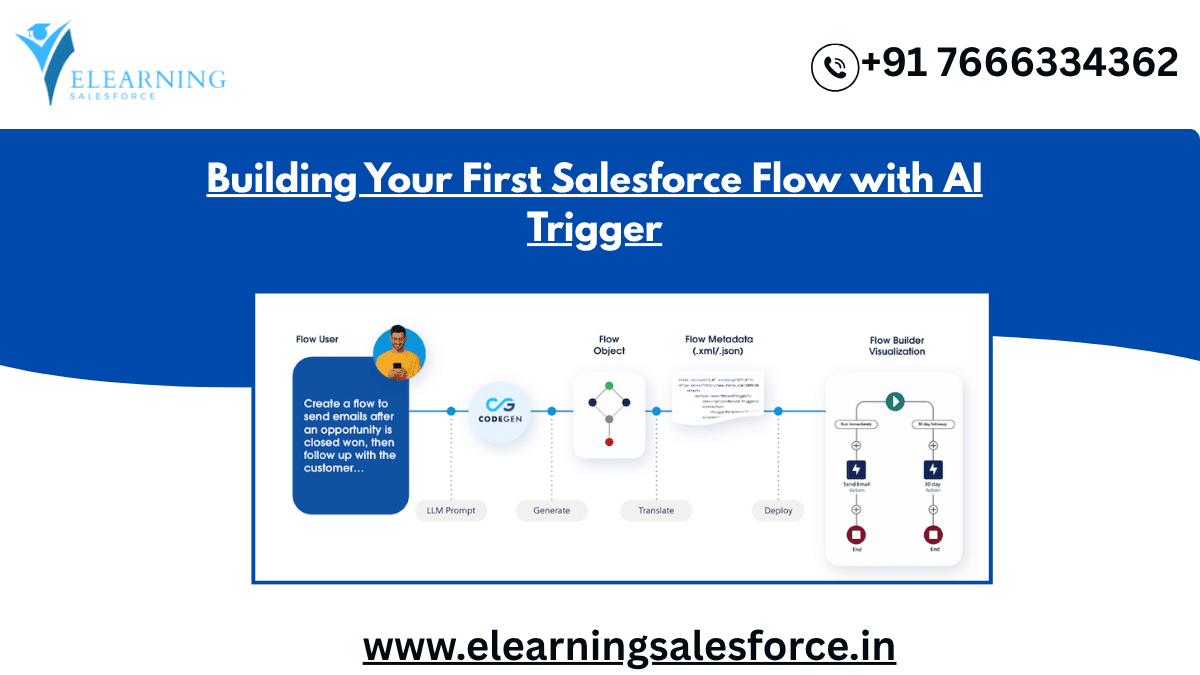
In today’s rapidly evolving digital landscape, automation is no longer a luxury—it’s a necessity. For organizations using Salesforce, the ability to streamline repetitive processes and leverage data-driven insights can significantly boost productivity and decision-making. That’s where Salesforce Flow with AI Trigger comes into play. It combines the intuitive no-code capabilities of Salesforce Flow with the predictive intelligence of AI, enabling business users and administrators to design smart, automated workflows without writing a single line of code. Whether you’re a Salesforce beginner or a professional looking to modernize your workflow, this guide will walk you through everything you need to know about building your first flow powered by AI triggers.
Understanding the Power of Salesforce Flow
Before diving into AI triggers, it’s important to understand what Salesforce Flow actually does. Salesforce Flow is a visual automation tool that allows users to create logic-based workflows to handle tasks such as data updates, email alerts, record creation, or approvals—all without requiring advanced programming knowledge. It’s designed to make automation accessible to everyone, from administrators to business analysts.
Flows can be designed to run automatically or be triggered by user interactions. The true magic of Salesforce Flow lies in its flexibility—you can automate anything from a simple follow-up email to a complex cross-departmental process. By integrating AI into this structure, Salesforce takes automation a step further, enabling predictive and intelligent workflow execution that adapts to real-world conditions.
What is an AI Trigger in Salesforce?
An AI Trigger in Salesforce is a mechanism that initiates an automated flow based on insights or predictions generated by artificial intelligence models, such as Einstein AI. Instead of relying solely on static conditions (like a field update or a user action), an AI Trigger uses dynamic intelligence. For instance, it might activate a flow when the system predicts that a customer is likely to churn or when an opportunity score surpasses a certain threshold.
This functionality allows Salesforce users to move from reactive to proactive automation. Rather than waiting for events to happen, your system anticipates them and takes preemptive action—saving time, improving engagement, and increasing business agility.
Getting Started: Building Your First Salesforce Flow with AI Trigger
Now that you understand the concept, let’s explore how to build your first flow with an AI Trigger. The process is intuitive, and even non-technical users can follow along with ease.
Step 1: Define Your Business Objective
Start by identifying what you want your flow to accomplish. For example, if your sales team wants to proactively reach out to high-potential leads, your flow could be triggered when an AI model predicts that a lead has a high probability of conversion. Having a clear objective helps structure your flow effectively.
Step 2: Create or Identify an AI Prediction
Use **Einstein Prediction Builder** or **Einstein Discovery** to generate the predictive data that your flow will rely on. For instance, you might create a model that predicts customer churn or lead conversion scores. Once you have your prediction ready, it can act as the AI trigger for your flow.
Step 3: Configure the Trigger
In Salesforce Flow Builder, select the AI Trigger as the flow’s starting element. Choose the condition that will activate the flow—such as when the predicted score crosses a certain threshold or when AI confidence exceeds 80%. This ensures your automation only runs when it truly matters.
Step 4: Build Your Flow Logic
Add the actions and decision nodes that your flow will perform once triggered. For instance, you can automatically create a follow-up task, send a personalized email, update a field, or assign a record to a specific team member. Use Salesforce’s drag-and-drop interface to visually design your logic without any coding.
Step 5: Test and Activate
Once your flow is configured, test it thoroughly using sample data. Ensure that the AI Trigger fires correctly and the subsequent actions perform as expected. When satisfied, activate your flow and watch automation unfold seamlessly.
Real-World Applications of Salesforce Flow with AI Trigger
AI-powered automation is transforming how businesses use Salesforce. Here are some practical examples:
1. Predictive Lead Nurturing
AI can analyze engagement patterns and trigger flows when a lead shows signs of high intent. Salesforce can automatically assign the lead to a top sales rep or send tailored messages, ensuring faster conversions.
2. Customer Retention Automation
When AI predicts that a customer might churn based on support interactions or inactivity, the system can automatically trigger retention campaigns, discount offers, or follow-up tasks for account managers.
3. Opportunity Management
AI triggers can monitor opportunity health scores and initiate reminders or deal-acceleration strategies when key milestones are at risk.
4. Service Case Prioritization
Customer service teams can use AI triggers to escalate cases predicted to have a high impact on satisfaction, improving response times and overall customer experience.
Why Businesses are Embracing AI-Driven Flows
Organizations are increasingly realizing that manual processes limit scalability and speed. AI-driven Salesforce Flows enable smarter, data-informed automation that minimizes human error while maximizing personalization and efficiency. The integration of AI Triggers also ensures that automation remains contextually aware—meaning it reacts not just to actions, but to insights and probabilities.
According to Salesforce’s latest State of Automation report, businesses using AI automation experience up to 40% faster workflow execution and a 30% increase in customer engagement. This growing trend highlights how deeply embedded intelligent automation is becoming across industries, from retail and manufacturing to financial services and healthcare.
Best Practices for Building AI-Powered Flows
To ensure your Salesforce Flow with AI Trigger delivers consistent results, consider the following best practices:
Start Simple and Scale Gradually
Begin with small, focused flows that handle specific use cases. Once you’re comfortable with the setup, expand to more complex automations.
Monitor and Optimize
AI models evolve over time, and so should your flows. Regularly analyze performance metrics and refine conditions or thresholds as needed.
Collaborate Across Teams
Work with sales, marketing, and IT teams to ensure that automated actions align with broader business goals and customer experience standards.
Ensure Data Quality
AI predictions are only as good as the data they’re trained on. Maintain clean, accurate data to improve model reliability and flow accuracy.
Empowering Business Users with No-Code Intelligence
One of the most empowering aspects of Salesforce Flow with AI Trigger is that it democratizes automation. Business users no longer need to depend on developers to bring their ideas to life. With no-code tools and built-in AI models, users can quickly design, test, and deploy intelligent workflows that deliver measurable results. This shift not only accelerates innovation but also fosters a culture of autonomy and continuous improvement across teams.
Looking Ahead: The Future of AI in Salesforce Automation
As Salesforce continues to evolve, AI Triggers will play an even greater role in shaping intelligent automation. The future will likely bring more intuitive interfaces, pre-trained AI models, and integration with third-party data sources—allowing companies to predict, adapt, and act faster than ever before.
By building your first Salesforce Flow with AI Trigger today, you’re not just automating tasks—you’re laying the groundwork for a smarter, more responsive business ecosystem.
Take the Next Step
Now that you understand how to build your first Salesforce Flow with AI Trigger, it’s time to put theory into practice. Explore our step-by-step guides, advanced tutorials, and online courses to deepen your Salesforce automation expertise and take your business workflows to the next level. The future of intelligent automation starts with one flow—make it yours today.
you may be interested in this blog here:-
SAP Analytics Cloud for IoT Data Analysis
CDS in Action: Building Practical Applications
How do I create an optimization profile in Salesforce Field Service?
Master SAP Business Process Integration In Complex IT Landscapes


